Bold Patterns: Seamless Vector Designs for Real-World Workflows
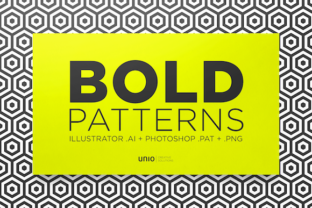
Bold Patterns is a curated collection of 20 high-fidelity, seamless vector patterns designed to integrate cleanly into professional and personal creative workflows. Unlike generic texture packs or low-resolution tile sets, Bold Patterns prioritizes technical precision and cross-platform compatibility—each design is delivered in three formats: native Adobe Illustrator (.ai), Photoshop-compatible pattern swatches (.pat), and transparent PNG tiles (2x resolution). This isn’t just about aesthetics; it’s about reducing friction between intention and execution.
Where Bold Patterns Fits in Your Process
Most pattern libraries are treated as afterthoughts—added late in design, patched in during revisions, or swapped out when clients request “something bolder.” Bold Patterns flips that sequence. Because every pattern is built as a true vector tile with mathematically precise alignment and scalable geometry, it supports early-stage planning just as reliably as final export. You can sketch layout concepts directly in Illustrator using the .ai files, test visual hierarchy in Figma via embedded PNGs, or build reusable brand assets in Photoshop with the .pat swatches—all without reimporting, rescaling, or fixing misaligned seams.
This makes Bold Patterns especially useful in phases where consistency matters most: brand system development, presentation deck templating, marketing asset batches, or even course material design for educators. A freelance designer building a client’s style guide can embed a Bold Pattern swatch into their master document library and know it will render identically whether viewed on a retina screen, printed at 300 dpi, or exported as SVG for web use.
Integration Across Tools and Teams
Compatibility isn’t theoretical—it’s tested across common production environments. The .ai files open natively in Illustrator CC 2020+, preserving layers, grouping, and editable paths. That means you can adjust stroke weights, recolor fills, or isolate elements without rasterizing or losing fidelity. The .pat files load instantly into Photoshop’s pattern library panel (via Edit > Presets > Preset Manager), enabling one-click application to shapes, masks, or smart objects—no manual tiling or blending mode guesswork.
The PNG variants serve a different but equally critical role: accessibility and portability. They’re sized to tile perfectly at standard web resolutions (1200×1200 px) and include alpha transparency, so they drop cleanly into Canva, Figma, Webflow, or even PowerPoint without background clipping or edge artifacts. For teams using shared cloud drives or version-controlled asset repos, storing the PNGs alongside documentation ensures non-designers—like copywriters, project managers, or educators—can apply consistent visuals without needing design software licenses.
Practical Implementation Tips
- Start with your output requirement. If final delivery is print-based, begin with the .ai file to retain full editability. If you’re building digital templates for recurring use (e.g., social media banners or email headers), use the .pat swatch in Photoshop or the PNG in Figma—both support rapid iteration and team-wide reuse.
- Test seam integrity before scaling. Even with vector precision, zoom to 400% in Illustrator and pan across tile boundaries. Bold Patterns’ designs eliminate visible joins at any zoom level, but verifying this step prevents surprises during large-format printing or high-DPI exports.
- Organize by function—not just appearance. Instead of naming files “Pattern_07” or “Bold_Blue,” rename them based on use case: “Brand_Border_FullWidth,” “Presentation_Background_Subtle,” or “Print_Swatch_Cardstock.” This speeds up retrieval during tight deadlines and supports long-term asset management.
- Use color flexibility intentionally. All .ai files are built with global swatches and ungrouped paths, meaning you can change the base color once and update every instance across the pattern. For branding projects, assign corporate colors to swatches first—then generate variations for light/dark modes or seasonal campaigns without rebuilding from scratch.
Workflow Examples Across Roles
A small business owner launching a product line might use Bold Patterns to unify packaging mockups, Shopify banners, and Instagram story templates. Starting with the .ai file in Illustrator, they define exact bleed areas and trim marks, then export layered PDFs for their printer. Simultaneously, they drag the matching PNG into Canva to build weekly promo graphics—ensuring visual continuity without switching apps.
An educator designing printable worksheets applies the same logic differently. They import the .pat swatch into Photoshop, create a custom pattern fill layer behind text boxes, and export as print-ready PDFs. For digital handouts, they drop the PNG into Google Slides—scaling it to fit slide dimensions while maintaining crisp edges. No need to explain “how to tile” to teaching assistants; the assets work as expected, every time.
For marketers running A/B tests on landing pages, Bold Patterns’ PNGs let them swap background treatments in Webflow or WordPress within minutes. Because each tile is identical in dimension and transparency, loading performance stays consistent—and analytics aren’t skewed by image decode delays or layout shifts.
Long-Term Usability and Quality Control
Bold Patterns avoids common pitfalls that degrade over time: no embedded raster effects, no locked layers, no font dependencies, and no proprietary plugins. Every file is self-contained and editable with industry-standard tools. That means your 2024 project assets remain fully functional in 2027—even if software versions change—because the underlying vector structure hasn’t been flattened, masked, or obfuscated.
Consistency also extends to metadata. Each file includes embedded XMP tags identifying creator, license type, and version number. When stored in a DAM (Digital Asset Management) system or shared drive, this enables reliable filtering and audit trails—critical for agencies managing multiple client brands or publishers tracking asset reuse across titles.
Efficiency gains compound with repetition. Once you’ve built a template using one Bold Pattern swatch, duplicating that structure for a new campaign takes under five minutes: replace the swatch name, adjust the color palette, and export. There’s no reverse-engineering of tile offsets or troubleshooting opacity mismatches. The pattern behaves predictably because it was built to do so—not optimized for a single platform or momentary trend.
Making It Fit Your Routine
You don’t need to overhaul your workflow to benefit from Bold Patterns. Start small: pick one recurring task where repetitive background creation slows you down—be it slide deck formatting, social post resizing, or branded PDF generation—and substitute one Bold Pattern file in place of your current method. Track how much time you save over three uses. Then expand to two more use cases where visual cohesion impacts perception: client presentations, email newsletters, or physical collateral.
What makes Bold Patterns sustainable isn’t just its technical specs—it’s how quietly it operates inside existing habits. It doesn’t demand new software, new training, or new approval processes. It asks only that you treat pattern selection as part of your pre-production checklist, not a last-minute fix. That shift—from reactive to intentional—changes outcomes more than any single design choice.
Whether you’re preparing a pitch deck before sunrise, iterating on a client’s website banner at noon, or prepping classroom materials the night before term starts, Bold Patterns delivers predictable, scalable, and truly seamless results—without requiring you to become a pattern engineer to use it well.